Wednesday, 16 March 2011

ITUNES UPGRADE ERROR

Last weak i upgrade itunes but for no reason it fail the upgade so i start to unistall everything with apple name and itunes ask for the msi install, that i no longer have so i used the tool that Microssoft don't have anymore the "http://www.divshare.com/download/14327695-131" to delete itunes. Then i made a new install to itunes 10.2.0. Today i loaded itunes to play music for my baby and i been asked to upgrade to 10.2.1, so this time i download the instaler, and unistall everything apple name, but this time is quicktime that can't be removed, some key error "could not open key
unknown\components\" so i look for a solution and i encounter @ http://answers.microsoft.com
to solve this start type "regedit" click on it to opem [regitry editor] and navigate to "HKEY_LOCAL_MACHINE\SOFTWARE\Microsoft\Windows\CurrentVersion\Installer\UserData\S-1-5-18\Components" locate the key number that the error display, after you locate the error key
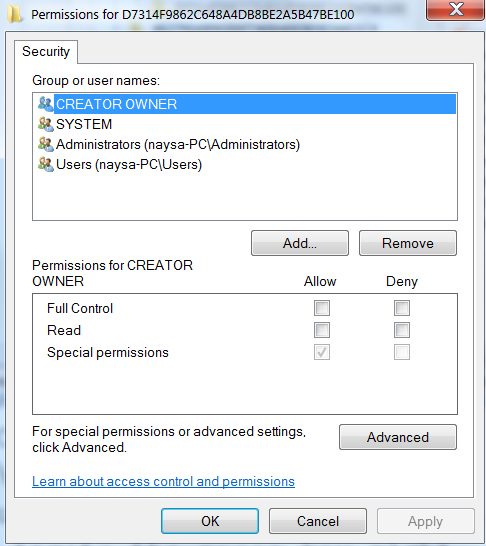
right click | permissions |

  advance |

owner tab, i have two owners so i click ok back to permissions and a check the two boxes, apply
advance again owner tab check the box, apply
this solve my itunes install error.

Sunday, 27 February 2011

Sunday, 13 February 2011

Mandriva One kde 4 on VirtualBox

Tools:
VirtualBox @ http://www.virtualbox.org/wiki/Downloads
Mandriva One @ http://www.mandriva.com/ch/downloads/one/

                        Mandriva One is a 32bit Os with KDE 4 Desktop,
running on a vaio laptop Intel core2duo 2ghz, 2 gb memory, 128mb graphics 8400m gt, Os Ubuntu 64bit.

after boot all files from the iso, this is the screen
the KDE 4 panel where you can add widgets
Mandriva Galaxy window the first to window that opens
a menu like Windows
very Windows alike
no doubt is Windows alike
living the live iso "live cd" but VirtualBox mount the iso as cd
last screen, i try this on my box 4 core, 1024mb graphics, 4gb memory and this run like light very fast that i will use a dual boot no problems with all my hardware in this box. 

Friday, 4 February 2011

How To Restart Compiz Without Log Out The PC ?

For some reason the compiz on my desktop is not working at times so I add to log out to restart compiz but I look on Ubuntu forum and found this command
Alt+F2
compiz --replace

that do the job with out the need of log out of Ubuntu.
 the window don't have the | close | minimise | maximise bar
 this window have the Close | minimise | maximise bar.